



Providers




Sport




Slots
Minigames.
Betlive login – How to Sign In to Your Betlive Account
Accessing your online profile is usually a routine task, but it becomes important when you need to confirm your identity, manage account security or troubleshoot access problems quickly. This guide explains the Betlive login process in a practical, neutral way: what you need before signing in, how the sign-in flow works on desktop and mobile browsers, what common issues look like and how to handle them without compromising security.
Understanding the Betlive Login Process
The Betlive login process is designed to verify that account access is granted only to the authorized user. To sign in on the Betlive website an existing account is required, along with the username linked to the profile and the corresponding password. These two elements form the primary method of authentication on the platform.
In addition to standard login credentials, users can enable SMS code verification as an extra security measure in their account settings. When this option is activated, a one-time SMS code may be required during the login process to confirm the user’s identity. This verification step is optional and depends on the security preferences selected within the account.
Beyond visible input fields, the login process also relies on technical session checks that help maintain account integrity. These may include browser cookies, session validation and basic protection against repeated unsuccessful login attempts. While these mechanisms operate in the background, they can influence whether access is granted, particularly if login attempts are made from a new device, browser or unstable internet connection.
What Is Required to Access a Betlive Account
Before attempting to sign in, it helps to know what you’ll need and what can interfere with the process.
Account prerequisites
- An existing Betlive account (created previously).
- The login identifier used during registration (a username and phone number).
- A password.
- Access to the phone number linked to the profile if SMS verification is enabled.
Technical prerequisites
- A modern browser (Chrome, Safari, Firefox, Edge) with cookies enabled for the site.
- A stable internet connection.
- If you use VPN/ad blockers/script blockers: be aware they can break sign-in forms, CAPTCHA steps or session cookies. Disabling them temporarily for the login session often resolves unexplained loops (for example, endless loading after pressing “Sign In”).
Information you should have ready (without storing it unsafely)
- Your identifier (username and phone number).
- Your password and the ability to receive an SMS code if you use SMS verification.
- A secure way to access your email or phone in case you need to reset a password or confirm account recovery steps.
If you are signing in from a shared computer (workplace, hotel, internet café), it is also important to plan for a safe exit: private browsing can reduce residual data, but it can also interfere with cookies and session checks. If private mode prevents a successful login, using a normal browser session and then manually clearing site data after logout is often more reliable.
How to Access Your Betlive Account
Accessing a Betlive account follows a clear and structured process that is intended to balance usability with account security. While the interface is designed to be straightforward, successful login depends on entering the correct information and understanding how the system confirms user access. Knowing how each step works helps avoid common mistakes and reduces the risk of temporary access issues.
Providing Account Login Details
To access a Betlive account, the login button is located in the upper right corner of the website’s main menu. This entry point is consistent across the site and leads to the account authentication form.
The login process on Betlive requires the username associated with the account and the account password. After opening the login form, users enter these details and submit the request to sign in.
If SMS verification is enabled in the account security settings, an additional confirmation step is required. In this case, after submitting the phone number and password the system sends a one-time code via SMS to the registered phone number. Access to the account is granted only after the correct code is entered.
Once all required details are confirmed, the system completes the login session and provides access to the account. To avoid technical interruptions, it is recommended to wait for the confirmation process to finish before making additional login attempts.
Practical input tips that prevent common errors:
- If you use password managers, confirm that it inserts credentials for the correct domain (for example, not an old saved entry for a similar-looking site).
- Watch out for hidden spaces when copying and pasting usernames or passwords.
- Confirm your keyboard language (EN/GE/RU layouts) before typing passwords. Layout mismatches are a frequent cause of “wrong password” errors even when users are sure they typed correctly.
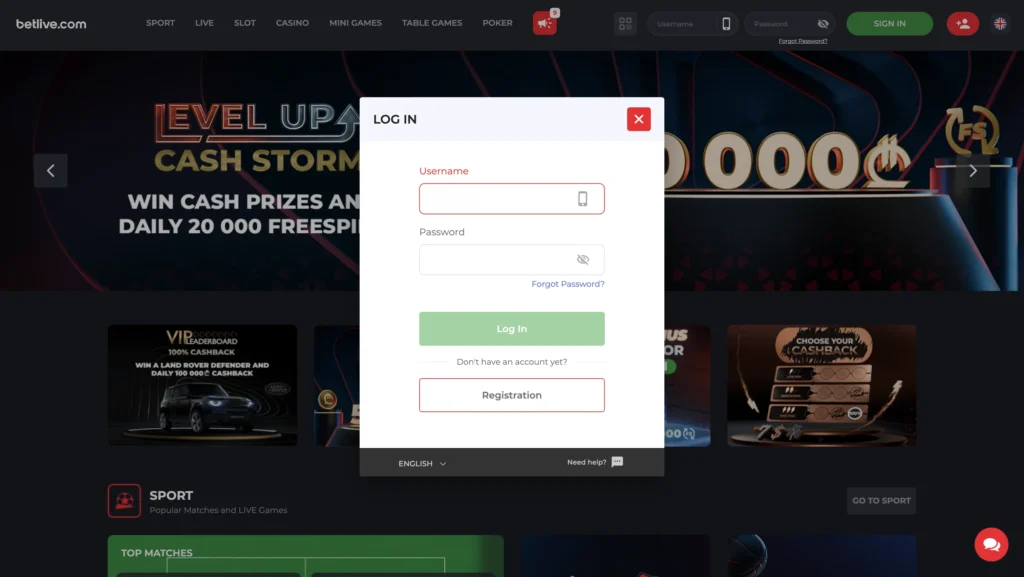
Screenshot from betlive.com, checked 2026-02-03
Account Access Confirmation
Once the login attempt succeeds, the platform confirms access by:
- Redirecting you to an authenticated homepage and dashboard
- Showing your profile name
- Unlocking navigation to sections that are not available to guests
If the page refreshes but you still see a “Login” button (or the sign-in form returns immediately), that usually indicates one of the following:
- Cookies are blocked or cleared automatically
- The session token was not stored
- A network filter or browser extension blocked essential scripts
- The login was rejected (but the error message didn’t display properly)
In that situation, focus on browser fundamentals first: allow cookies for the site, disable strict tracking blockers for that session and try again using a normal (non-incognito) window.
Common Betlive Login Issues and General Solutions
Login issues tend to repeat across platforms. Below are the most common categories and what you can do without taking risky steps.
Incorrect credentials
- Symptom: error such as “wrong password” / “invalid credentials.”
- General solutions:
— Re-type manually instead of pasting.
— Confirm keyboard layout.
— If you’re unsure, use the Forgot Password flow shown on the login interface.
SMS code not arriving (SMS verification)
- Symptom: no code received, delayed code or “code expired.”
- General solutions:
— Check mobile signal and SMS inbox filtering.
— Avoid requesting many codes in a short time (systems can throttle requests).
Account temporarily locked or blocked after many attempts
- Symptom: repeated failures followed by inability to submit login or a message about limits.
- General solutions:
— Wait a short period and retry once.
— Reset the password rather than continuing to guess.
— Contact support if lockout persists.
Browser/session problems
- Symptom: login loops, form submits but returns to login page.
- General solutions:
— Enable cookies and allow site storage.
— Clear site data for Betlive (cookies + cache) and reload.
— Try a different browser or update your current one.
— Disable VPN/ad blockers temporarily.
Account Security and Responsible Use
Account security plays an important role in maintaining controlled and uninterrupted access to a Betlive profile. Login credentials and verification settings are directly linked to personal account data and activity, which makes proper security practices a necessary part of responsible account use.
Password Protection and Login Safety
Account access is a security boundary: anyone who logs in can potentially view personal data, initiate actions or change settings. Even if you do not store funds in the account, protecting access reduces risk of identity misuse and unwanted activity.
Strong password practices are the same as for email and banking:
- Unique password (not reused from social media or other services).
- Long passphrase over short complex strings (easier to type correctly, harder to guess).
- Password manager stored locally or with a reputable provider, protected by a strong master password.
- No sharing (even with friends or relatives). Shared access makes it difficult to prove who initiated account actions.
Treat the phone number as part of your authentication perimeter. Keep your SIM secure, use a PIN lock on the SIM if available and avoid leaving your phone unattended while logged in.
Finally be cautious with “remember me” prompts on shared devices. Convenience features can keep sessions active longer than you expect.
Keeping Betting Activity Secure
Security is not only about the password. It also includes how you manage sessions and devices.
Good baseline habits:
- Log out after finishing, especially on shared computers.
- Do not save passwords in public browsers.
- Avoid public Wi-Fi for account access when possible. If you must use it, avoid financial actions and consider switching to mobile data.
- Review account settings periodically for unfamiliar device sessions (if the platform provides such logs) and check whether contact details were changed.
Responsible use also means understanding that sports betting and casino games involve risk and uncertainty. Login security helps ensure that only you control access, but it does not change the underlying nature of gambling outcomes.
Betlive Account Access for Users in Georgia
Users located in Georgia access Betlive through an environment that is specifically adapted to local conditions. The platform is structured with the Georgian market in mind, which affects how the website functions, how accounts are accessed and how services are presented after login. As a result, account access for Georgian users is integrated into the site’s core functionality rather than relying on external or region-specific workarounds.
Availability of Betlive Login in Georgia
Betlive login is available to users located in Georgia through the main website without the need for additional tools or alternate access methods. The platform operates in a way that supports stable account authentication within the country, allowing users to sign in using standard login credentials under normal browsing conditions.
For users in Georgia access is not limited by regional redirects or separate domains. The login process remains consistent and accessible from within the local network environment, which helps reduce technical barriers related to location-based access restrictions. This approach allows Georgian users to interact with the platform using the same login flow on desktop and mobile browsers.
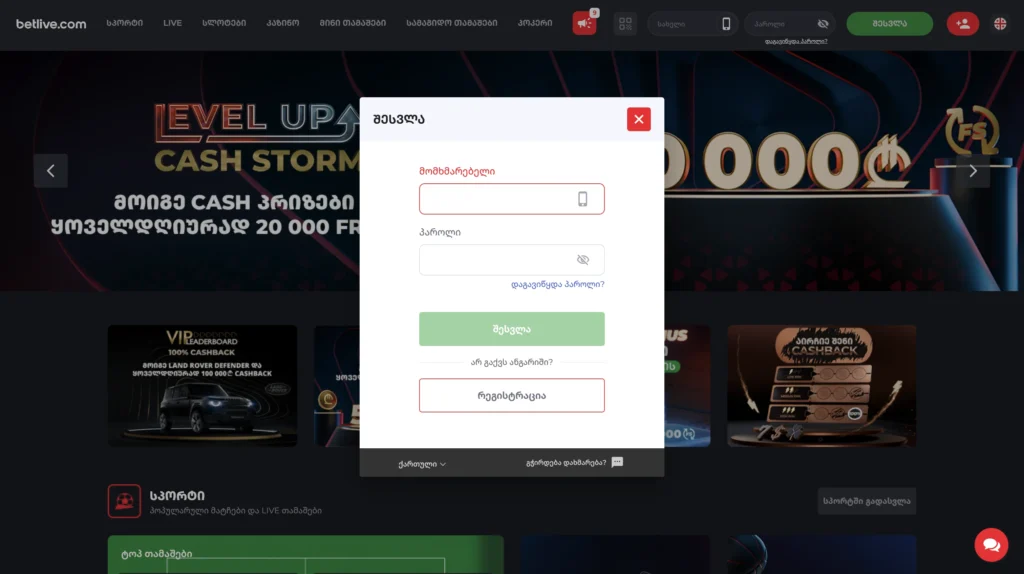
Screenshot from betlive.com, checked 2026-02-03
Language Preferences and Regional Settings
The Betlive interface is designed to support Georgian users through localized language options and regional formatting. The default site presentation prioritizes the Georgian language, making navigation, account management and security settings easier to understand for local users.
Language preferences can influence how login-related messages, system notifications and account prompts are displayed. Clear localization helps minimize misunderstandings during account access, especially in situations involving password input, SMS verification or security alerts. Regional settings also align basic site elements, such as navigation structure and account sections, with user expectations in Georgia.
Access to Sports Betting and Casino Sections After Login
Once logged in, users in Georgia gain unified access to Betlive’s sports betting and casino-related sections through a single account session. Navigation between different parts of the platform does not require repeated authentication, as long as the login session remains active.
Access to sports markets, live betting and casino game sections is organized under the same account environment, allowing users to move between sections without technical interruptions. If any limitations apply to specific actions, they are typically linked to account status or security requirements rather than regional access restrictions, which helps ensure a consistent experience for users in Georgia.
Support Options Related to Betlive Login
Login-related issues are not always resolved through standard troubleshooting steps, especially when they involve account recovery, security settings or access verification. In such cases, direct assistance becomes an important part of maintaining uninterrupted access to a Betlive account.
Available Customer Support Channels
When login problems involve account recovery, identity confirmation or SMS security settings, official support is usually the correct escalation route.
When contacting support about login, prepare:
- Your account identifier (username/registered phone/email)
- A brief description of the issue (what happens when you try to log in)
- Your device + browser (e.g., iPhone Safari, Android Chrome, Windows Edge)
- Whether you are using VPN/ad blockers
- The approximate time the issue started
Avoid sending sensitive data that support teams do not need (for example, do not send full passwords). Legitimate support will not require your current password in plain text.
Assistance With Account Access Recovery
Account recovery usually falls into a few categories:
Password reset
- If the login page includes “Forgot Password,” use it first, because it follows the platform’s official flow and reduces the chance of miscommunication.
- Complete reset steps only on pages that clearly belong to the official domain.
SMS-related access
- If your account relies on SMS verification, loss of phone access can block sign-in. For certain SMS security changes, users should contact support (hotline/email/live chat).
- Expect support to ask verification questions before making changes that affect access.
Compromised account concerns
If you suspect someone else accessed your account (unfamiliar activity, settings changed, repeated OTP messages you didn’t request):
- Stop trying random fixes.
- Reset your password using the official flow if possible.
- Contact support immediately and describe the suspicious behavior.
- Secure your email account and phone number first, because they are often the keys to account recovery.
A final practical point: recovery can take longer if you provide incomplete information. A concise, factual message with device details and exact error behavior is more effective than multiple short messages.
Sources
https://www.betlive.com/ru/info/content/privacy
https://www.betlive.com/ru/info/terms/general
https://www.betlive.com/ru/info/content/18plus
https://www.betlive.com/ru/info/faq
FAQ
What details are required for Betlive login?
To log in to a Betlive account, users need the username linked to the account and the account password. These credentials are entered through the login form on the website. If SMS verification is enabled in the account settings, an additional one-time code sent via SMS is also required to complete the login process.
How do I log in to my Betlive account?
To access a Betlive account, open the official website and select the login option located in the upper right corner of the site menu. Enter the registered username and password, then submit the form. If SMS verification is activated, confirm the login by entering the code sent to the registered phone number.
Why can’t I log in to my Betlive account?
Login issues may occur for several reasons, including incorrect username or password, temporary technical problems, disabled cookies in the browser or repeated unsuccessful login attempts. Access may also be affected if SMS verification is enabled and the confirmation code is not entered correctly or expires before submission.
What should I do if I forget my Betlive password?
If the password is forgotten, users should use the password recovery option available on the login form. This process allows the password to be reset following on-screen instructions. For cases where password recovery cannot be completed independently, contacting Betlive support is the appropriate next step.
Is Betlive login available for players in Georgia?
Yes, Betlive login is available for users located in Georgia through the main website. The platform is adapted for the local market and users in Georgia can access their accounts without the need for alternative domains or location-based workarounds, provided standard account and technical requirements are met.
How secure is the Betlive login process?
The Betlive login process includes standard security measures such as password-based authentication, optional SMS verification and session controls. These mechanisms are intended to protect account access and reduce the risk of unauthorized use. The level of security depends partly on the settings enabled by the user, such as SMS verification and password strength.
How can I contact support if I have login issues?
If login problems cannot be resolved independently, users can contact Betlive support through the official support channels listed on the website. When contacting support, it is recommended to provide basic account identification details and a clear description of the login issue, without sharing sensitive information such as passwords.